
How to Open Google Maps Saved Places in Baidu Maps
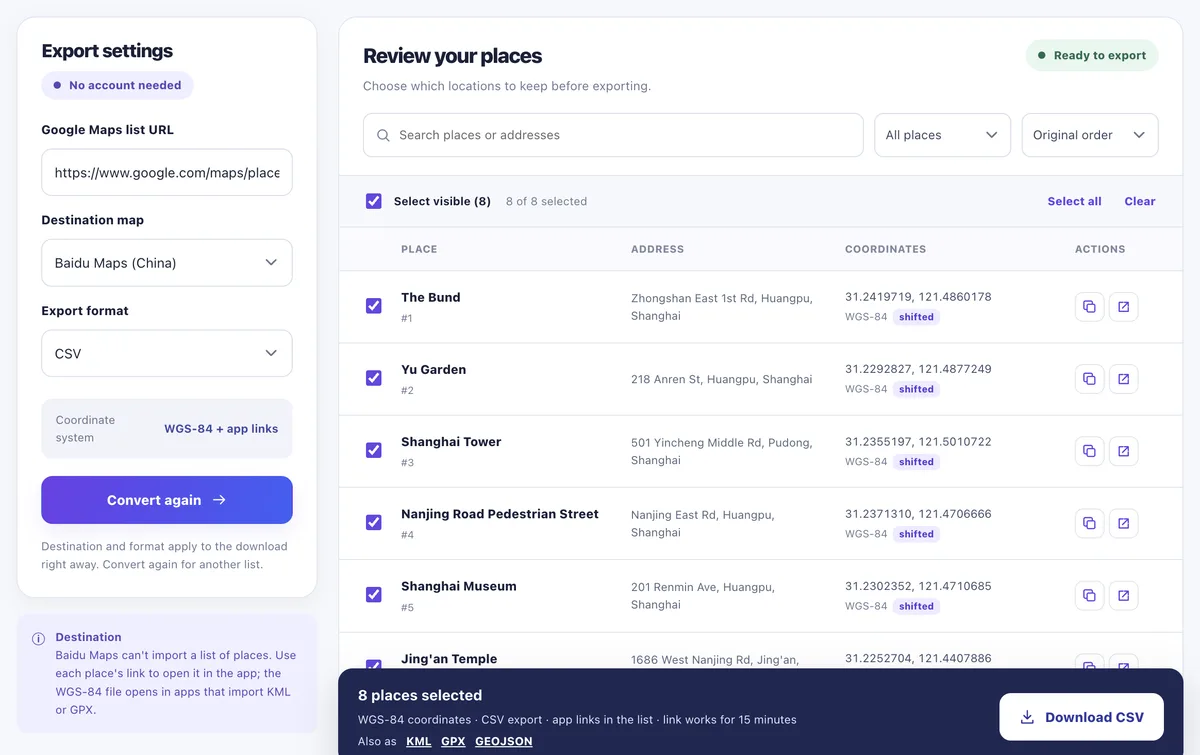
Baidu Maps can't import a Google Maps list, and it uses its own coordinate system (BD-09), so copied coordinates land off. Pinshift gives you a Baidu Maps link for every saved place that tells Baidu which coordinates it carries, so each place opens at the right spot.
Share the list in Google Maps
Open Saved, pick the list, tap Share and copy the link ("Anyone with the link").
Convert for Baidu Maps
Paste the link, choose Baidu Maps (China) and CSV, and press Convert.
Open or save the links
Tap "open" next to a place to see it in Baidu Maps, or download the CSV with a
linkcolumn to use later, offline.
How the links work
- They are Baidu's own marker links with a
coord_typeofgcj02orwgs84; Baidu converts to BD-09 itself (Baidu URI API). - They don't expire and don't need Google, so they work in mainland China.
- Each link opens one place; it doesn't add it to Baidu's favourites.
Prefer Amap? See Google Maps to Amap. Why coordinates shift at all: the China coordinate offset.
Convert your listQuestions
Can Baidu Maps import KML or a list of places?
No documented way exists. Pinshift gives you a Baidu Maps link per place and a WGS-84 file for other apps.
Why do my places land off in Baidu Maps?
Baidu uses its own BD-09 coordinates. Pinshift's links tell Baidu which system the coordinates are in, so Baidu converts them correctly.
Can I use the links in China?
Yes. They point to Baidu, not Google. Convert your list before the trip, since Google Maps is blocked in mainland China.
Related guides
Updated 15 November 2026 · All guides